







How to maintain Gmail email records for future disputes is a question many people ask only after a disagreement, audit, legal notice, or compliance review appears. The reality is simple: once you need a specific email, it may already be difficult to find, organize, or present properly. That’s why preserving important Gmail communications before a dispute occurs is always the better approach.
Whether you’re a business owner, freelancer, consultant, lawyer, or individual user, email often serves as proof of agreements, approvals, payment discussions, project updates, and critical decisions. Having an organized archive can save time, reduce stress, and help establish a clear record of communication.
Why Preserving Gmail Email Records Matters?
Think about how much important information sits inside a typical Gmail account. Contracts, invoices, customer conversations, vendor communications, receipts, and approvals are often stored there for years.
Now imagine being asked to produce a specific email from three years ago.
Without a proper archive, finding that information can become frustrating. Worse, if emails are accidentally deleted, lost during migration, or become inaccessible because of account issues, valuable evidence may disappear.
This is why many organizations maintain independent copies of important communications. Keeping records outside Gmail ensures that information remains available whenever it is needed.
Best Way to Maintain Gmail Email Records for Future Disputes
When I look at available options, the most practical solution is using a professional email preservation tool. For users searching for a dependable method, BitRecover Gmail Backup Tool stands out because it creates organized copies of Gmail mailbox data while giving users complete control over storage and accessibility.
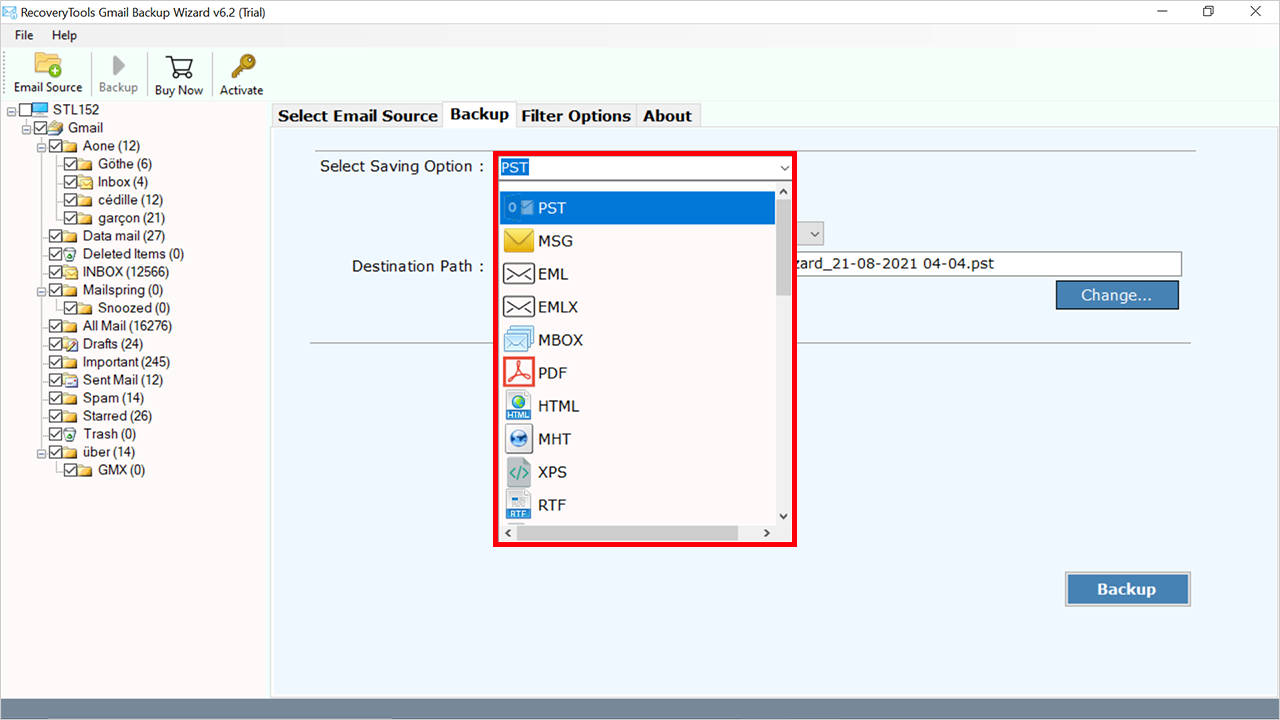
Instead of manually saving emails one at a time, the software connects directly to Gmail and exports mailbox data into multiple accessible formats. It supports more than 35 saving options, allowing users to preserve emails in formats that suit legal, compliance, archival, and documentation requirements.
This approach works particularly well when dealing with large mailboxes that contain years of communication history.
Features That Make BitRecover Gmail Backup Tool Useful
BitRecover Gmail Backup Tool is designed for users who want more than a simple export.
Some useful features include:
- Backup complete Gmail mailboxes
- Support for 35+ saving options
- Export emails with attachments
- Preserve folder hierarchy
- Maintain metadata and timestamps
- Select specific folders for export
- Apply date-based filters
- Save emails in accessible formats
- Support business and personal Gmail accounts
- Create organized email archives for future access
One feature that many users appreciate is flexibility. Different situations require different formats. Some users prefer to convert Gmail email to PDF for documentation, while others need PST, MBOX, EML, or MSG for email management and future access.
Steps to Preserve Gmail Emails for Future Reference
Using BitRecover Gmail Backup Tool is straightforward.
- Install and launch the software.
- Sign in to your Gmail account securely.
- Select mailbox folders to preserve.
- Choose one of the available saving options.
- Apply filters if required.
- Select a destination location.
- Start the export process.
After completion, your email records remain available outside Gmail and can be accessed whenever required.
This process is particularly useful when preparing for audits, compliance reviews, legal matters, client disputes, or account migrations.
Manual Methods to Keep Gmail Records
Some users prefer manual methods before considering professional solutions.
Google Takeout
Google Takeout allows users to export Gmail data into archive files.
Advantages:
- Free to use
- Official Google service
- Suitable for one-time exports
Limitations:
- Large archive files can be difficult to manage
- Restoration may require additional effort
- Limited organization options
- Not ideal for ongoing record preservation
Gmail emails download for legal purposes often begins with Google Takeout, but many users discover that exported archives become difficult to navigate when specific emails are needed later.
Email Client Synchronization
Another method involves configuring Gmail with Outlook or Thunderbird using IMAP.
Advantages:
- Creates local email copies
- Familiar user interface
Limitations:
- Requires configuration
- Sync issues may occur
- Limited backup management
- Less suitable for long-term preservation
These methods can work for basic storage needs, but they often require additional effort when records need to be organized and retrieved quickly.
Challenges of Manual Email Preservation
Manual approaches may appear convenient initially, but they often become difficult as mailbox sizes grow.
Common issues include:
- Time-consuming exports
- Limited searchability
- Difficulty locating old emails
- Large archive management problems
- Inconsistent folder organization
- Risk of incomplete preservation
A dedicated solution helps eliminate these challenges by automating the process and creating structured archives from the beginning.
Conclusion
How to maintain Gmail email records for future disputes becomes much easier when records are preserved before they are needed. While Google Takeout and email client synchronization offer basic export options, they often lack the organization, flexibility, and accessibility required for long-term documentation.
BitRecover Gmail Backup Tool provides a practical solution by allowing users to preserve Gmail communications using more than 35 saving options while maintaining attachments, metadata, timestamps, and folder hierarchy. For anyone who wants reliable access to important email records during future disputes, audits, compliance reviews, or business discussions, creating a structured archive is one of the smartest steps they can take.









Leave a Reply