






Witanworld Help Center Guide
Estimated Reading Time: 12–15 Minutes
INTRODUCTION
Managing your account and being able to sign in reliably are fundamental to your Witanworld experience. Whether you want to update account information, recover a forgotten password, resolve a login problem, or protect your account, this guide provides a practical starting point.
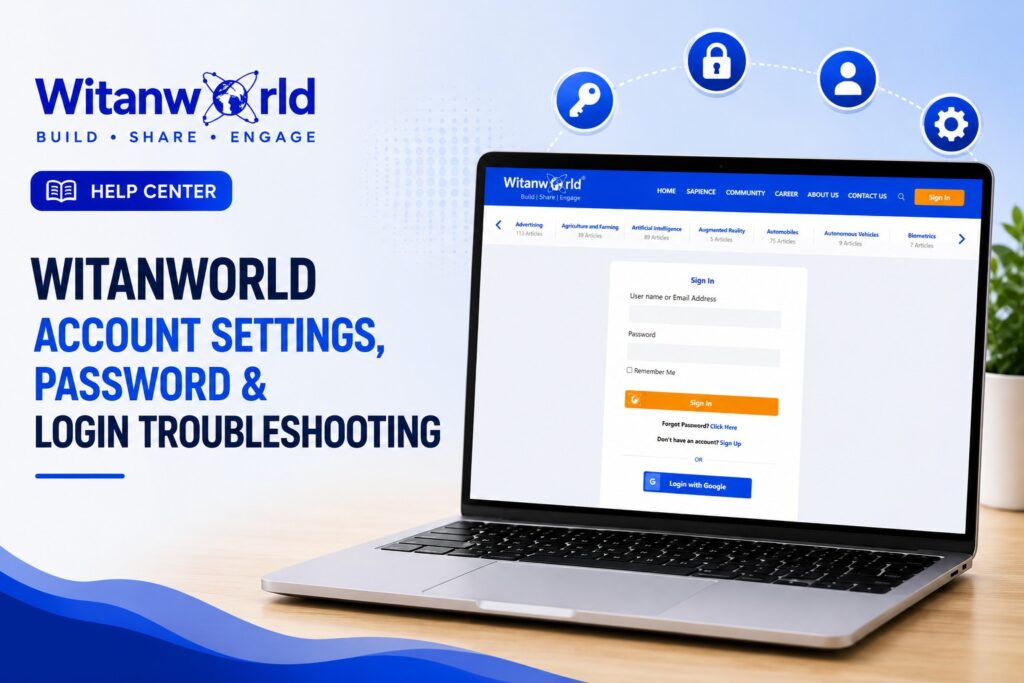
The current sign-in page supports login using a username or email address and password, provides a Remember Me option, and includes both Forgot Password and Sign Up links. (Witanworld)
1. Accessing Your Witanworld Account
To access your account, visit the official Witanworld Sign In page
Enter your:
Username or Email Address → Password → Sign In
Witanworld currently allows the first field to accept either your username or your registered email address. (Witanworld)
Before entering your credentials, particularly when following a link from an email or another website, check that you are on the official Witanworld domain.
2. Using “Remember Me”
The Witanworld sign-in page includes a Remember Me option. (Witanworld)
This can make repeat access more convenient on a trusted personal device.
Avoid using persistent-login options when accessing Witanworld from a:
- Public computer
- Shared workstation
- Hotel or airport computer
- Device you do not control
On shared devices, sign out when you have finished using Witanworld.
3. I Forgot My Password
Forgetting a password is one of the most common account-access problems.
Witanworld provides a Forgot Password? Click Here option directly on its current sign-in page. (Witanworld)
Use the password-recovery option rather than repeatedly guessing your password.
Recommended Process
Step 1 — Visit Sign In
Open the official Witanworld sign-in page.
Step 2 — Select “Forgot Password?”
Use the password-recovery link displayed beneath the login fields.
Step 3 — Follow the Recovery Instructions
Complete the password-recovery process presented by Witanworld.
Step 4 — Check Your Email
If recovery instructions are sent by email, check the inbox associated with your Witanworld account.
Step 5 — Create a New Password
When prompted, create a strong password that you are not already using for another important account.
Step 6 — Sign In Again
Return to Witanworld and test your new credentials.
Witanworld’s existing onboarding guidance also directs users who have forgotten their password to the Forgot Password option on the sign-in page. (Witanworld)
4. I Didn’t Receive the Password-Reset Email
If you requested password recovery but do not see an email immediately, don’t repeatedly submit reset requests.
First check:
- Inbox
- Spam folder
- Junk folder
- Promotions or filtered folders
- Whether you are checking the correct email account
- Whether your mailbox is receiving other messages normally
Also search your mailbox for Witanworld.
Allow a reasonable amount of time for the message to arrive before submitting another request.
If you still cannot recover access, contact Witanworld Support rather than repeatedly creating new accounts.
5. Incorrect Username or Password
If Witanworld does not accept your credentials, verify the basics first.
Check whether:
- Your email address is spelled correctly
- Your username is correct
- Your password was entered correctly
- Caps Lock is accidentally enabled
- Your keyboard is using the expected language/layout
- Spaces were accidentally copied before or after a credential
- Your password manager inserted credentials for another website
The current Witanworld login page explicitly requires a username/email and password and displays an error when those required credentials are missing. (Witanworld)
If you remain uncertain about the password, use Forgot Password rather than repeatedly guessing.
6. Try Your Registered Email Address
If you cannot remember your Witanworld username, try the email address associated with your account.
The current sign-in form specifically identifies the login field as:
“User name or Email Address.” (Witanworld)
This can eliminate the need to remember a separate username.
7. Password Best Practices
A strong password helps protect your Witanworld identity, content, connections, and account information.
Your password should ideally be:
- Long enough to resist easy guessing
- Difficult for another person to predict
- Unique to Witanworld
- Different from passwords used for email, banking, or other important services
Avoid obvious passwords based on:
- Your name
- Company name
- Birthday
- Phone number
- Username
- Common words
- Simple sequences such as
123456 - Easily guessed combinations
A password manager can also help you create and securely maintain unique passwords.
8. Never Share Your Password
Witanworld members should treat passwords as confidential.
Do not send your password through:
- Messaging applications
- Social media
- Comments
- Articles
- Groups or forums
Be cautious whenever someone asks you to disclose your password or login credentials.
A legitimate support process should not require you to publicly post your password.
9. I Can Sign In, but the Page Isn’t Working Correctly
Sometimes your credentials are correct but a browser or session problem interferes with the website.
Try the following sequence:
Refresh → Sign Out and Back In → Close Browser → Reopen → Retry
If the issue continues:
- Try a private/incognito browser window.
- Clear relevant browser cache/cookies if necessary.
- Check whether JavaScript and cookies are enabled.
- Temporarily test without browser extensions that may interfere with the page.
- Try another current browser.
- Try another device or network.
Testing one variable at a time helps determine whether the issue is account-specific or device/browser-specific.
10. Witanworld Works on One Device but Not Another
If you can access Witanworld successfully on one device but not another, your account itself may be functioning correctly.
Investigate the affected device for:
- Old saved passwords
- Browser cache
- Cookies
- Autofill errors
- Browser extensions
- Network restrictions
- Outdated browser software
Do not immediately reset your account simply because one browser is behaving unexpectedly.
11. Social Login Troubleshooting
Witanworld’s existing onboarding documentation describes registration/sign-in using traditional email credentials as well as social-login options such as Google or LinkedIn where those options are available in the applicable authentication flow. (Witanworld)
If you originally created your account using an external authentication provider, use the corresponding sign-in method when available.
If social authentication does not work:
- Make sure you are signed into the correct external account.
- Complete any authentication prompts.
- Check whether pop-ups or redirects are being blocked.
- Verify that the external account is still accessible.
- Try again in a current browser.
Do not create another Witanworld account merely because you temporarily cannot access the original authentication method.
12. Account Settings
Witanworld’s privacy documentation states that users can manage certain information through Witanworld settings, including the ability to access, rectify, and delete information.
Depending on the account functionality currently available to you, settings may be used to manage aspects of your account and information.
Because platform functionality can evolve, follow the options actually displayed in your Witanworld account rather than relying on an old screenshot or outdated instruction.
13. Updating Your Profile vs. Account Settings
It is useful to distinguish between account settings and your public/profile information.
Profile information may include items such as your:
- Profile photograph
- Bio
- Interests
- Location
- Expertise
- Other information you choose to present
Witanworld’s onboarding guidance asks new members to complete profile elements such as interests, username/handle, profile picture, location information, and a short bio. (Witanworld)
For detailed profile optimization guidance, refer to:
How to Create & Optimize Your Witanworld Profile
14. Changing Your Email Address
Your email address can be important for authentication, account recovery, and Witanworld communications.
If your account provides an option to change the registered email address, carefully follow the verification instructions shown.
Before changing it, make sure:
- You still have access to the current account.
- The new email address is correct.
- You can access the new mailbox.
- Any verification process is completed.
If the required change cannot be performed through the available account settings, contact Witanworld Support.
15. I No Longer Have Access to My Registered Email
This requires more care because password recovery may depend on the email address associated with the account.
Do not create a duplicate account immediately.
Contact Witanworld Support and provide enough non-sensitive information for the team to understand which account you are trying to recover.
Never email your current or previous password.
Support may need to establish appropriate account ownership before certain account-related changes can be made.
16. I Have More Than One Witanworld Account
If you accidentally created duplicate accounts, avoid continuing to publish and build separate identities until you determine which account you intend to retain.
Consider which account contains your:
- Articles
- Profile information
- Connections
- Activity
- Subscription or paid services
- Established identity
Contact Witanworld if administrative assistance is needed.
Do not assume that content, subscriptions, connections, or account histories can automatically be transferred or merged.
17. Account Security Warning Signs
Take action if you notice activity you don’t recognize, such as:
- Unexpected profile changes
- Content you did not publish
- Password-reset messages you did not request
- Changes to account information
- Unrecognized account activity
If you can still access the account, secure your credentials promptly.
If you cannot access it, use the official password-recovery process and contact Witanworld Support when necessary.
18. Suspicious Emails & Phishing
Be cautious of messages that claim to represent Witanworld and attempt to pressure you into:
- Providing your password
- Sending sensitive information
- Opening suspicious attachments
- Visiting unfamiliar domains
- Making an unexpected payment
- “Verifying” your account through an unknown website
For login, navigate directly to the official Witanworld website rather than relying on an unexpected login link.
The existing Witanworld onboarding guide similarly advises users to ensure they are on the correct URL to avoid phishing sites. (Witanworld)
19. Don’t Share Sensitive Information With Support
When reporting an account problem, provide information that helps diagnose the issue—but never send unnecessary secrets.
Useful information may include:
- Account username
- Registered email address
- Approximate time the problem occurred
- Browser/device
- Error message
- Screenshot of the error where appropriate
- Steps that produced the problem
Never include:
- Your password
- Full payment-card information
- Banking credentials
- Authentication secrets
- Other people’s private information
Screenshots should also be checked carefully before sending.
20. Account Deactivation & Deletion
Witanworld’s current privacy policy states that users can access, rectify, port, and delete certain data through Witanworld settings. It also distinguishes between deleting an account and temporarily deactivating it.
Account deletion should be considered carefully because the policy states that certain account information cannot be recovered after deletion and also describes specific treatment for Witan knowledge content.
Before deleting an account:
- Review the current Privacy Policy.
- Understand what will be deleted.
- Understand what may be retained.
- Save anything you are entitled to retain and may need later.
- Resolve outstanding billing or account issues where applicable.
Do not treat account deletion as a troubleshooting technique for login problems.
21. Troubleshooting Decision Guide
| Problem | Recommended First Action |
|---|---|
| Forgot password | Use Forgot Password |
| Forgot username | Try your registered email |
| Reset email not received | Check spam/junk and correct mailbox |
| Password rejected | Verify entry, then reset if necessary |
| Login page behaves incorrectly | Refresh and test another browser/session |
| Works on another device | Troubleshoot browser/device |
| Social login fails | Verify external account and authentication |
| Lost access to registered email | Contact Witanworld Support |
| Suspected unauthorized access | Secure/reset credentials promptly |
| Duplicate accounts | Identify primary account and contact Support if needed |
| Account-data question | Review Settings and Privacy Policy |
| Persistent unresolved issue | Contact Witanworld Support |
22. Before Contacting Support
Complete this quick checklist first:
I am using the official Witanworld sign-in page.
I checked my username/email for typing errors.
I checked Caps Lock.
I tried my registered email address.
I used Forgot Password if necessary.
I checked spam/junk for recovery messages.
I tried refreshing the page.
I tried a private/incognito session.
I tested another browser or device where practical.
I recorded the exact error message.
I have not shared my password with anyone.
This information can make troubleshooting significantly faster.
23. How to Contact Witanworld
If the issue cannot be resolved through the steps above, use the official Witanworld Contact page or Email: sapience.moderator@witanworld.com for general queries.
When requesting account assistance, describe the problem clearly and include the relevant non-sensitive troubleshooting details.
24. Frequently Asked Questions
Where do I sign in?
Use the official Witanworld Sign In page. (Witanworld)
Can I sign in using my email address?
Yes. The current login form accepts a username or email address. (Witanworld)
What should I do if I forget my password? Select Forgot Password?
Click Here on the sign-in page and follow the recovery process. (Witanworld)
Should I create another account if I can’t sign in?
Generally, troubleshoot or recover the existing account first. Creating duplicates can complicate your identity, content, and account history.
Can I use Remember Me?
Yes, the current sign-in page provides that option. Prefer it on trusted personal devices rather than public/shared computers. (Witanworld)
Can Witanworld help if I no longer have access to my registered email?
Contact Witanworld through its official support channel and explain the situation. Do not send your password.
Where can I learn about how Witanworld handles my account data?
Review the official Witanworld Privacy Policy, which covers account information management and deletion.
25. The Witanworld Account Access Principle
For most login problems, use this sequence:
Verify Credentials
→ Use Forgot Password
→ Check Your Email
→ Test Browser/Device
→ Review Account Settings
→ Contact Support if Unresolved
Avoid creating a new account or making major account changes before identifying the underlying problem.
Conclusion
Reliable account access starts with three fundamentals:
Secure Credentials. Accurate Account Information. Safe Login Practices.
Use the official Witanworld sign-in page, maintain a strong unique password, keep your registered email accessible, and use the built-in password-recovery process whenever necessary.
For technical problems, start with simple browser and credential checks before escalating the issue. If you still cannot regain access, contact Witanworld through the official support channel.
Secure Your Account. Protect Your Knowledge. Stay Connected.
Related Articles
Witanworld – Signup, Sign-in, Profile Onboarding,
How to Create & Optimize Your Witanworld Profile
How to Publish Your First Article on Witanworld
Witanworld Billing, Payments, Renewals & Invoices
Witanworld Privacy, Account Security & Data Management guide.









Leave a Reply