






Witanworld Help Center Guide
Estimated Reading Time: 12–15 Minutes
Introduction
Images are an important part of publishing on Witanworld.
A strong featured image can make an article more attractive, improve readability, strengthen the author’s message, and encourage people to discover and engage with the content. Poorly selected or unnecessarily large images, however, can reduce visual quality, slow page performance, create copyright concerns, or affect the overall publishing experience.
Witanworld therefore encourages authors to treat images as an integral part of article quality—not simply as decoration.
This guide explains how to select, prepare, optimize, and use images when publishing on Witanworld, including:
- Featured images
- Recommended image dimensions
- File-size optimization
- Image quality
- Copyright and licensing
- Image attribution
- AI-generated images
- Image relevance
- Image SEO
- Accessibility
- Common image mistakes
- Best practices before publication
The objective is simple:
Relevant Images + Strong Visual Quality + Small File Size + Proper Rights = Better Witanworld Content
1. Why Images Matter on Witanworld
Your article’s image may be one of the first things a reader notices.
Depending on where content appears across Witanworld, images can help readers quickly understand:
- What the article is about
- Whether the subject is relevant to them
- The professionalism of the content
- The context or theme of the article
A strong image can therefore contribute to:
Discovery → Attention → Engagement → Readability → Knowledge Sharing
Images should support the knowledge being shared rather than distract from it.
2. What Is a Featured Image?
A Featured Image is the primary visual associated with your Witanworld article.
Think of it as the article’s visual introduction.
For example, an article titled:
The Future of Artificial Intelligence in Healthcare
should ideally use a visual that clearly represents concepts related to artificial intelligence, healthcare, technology, medical innovation, or the specific subject discussed.
The featured image should help readers understand the subject before they begin reading.
3. Every Article Should Have a Relevant Featured Image
Where the publishing workflow supports a featured image, authors are strongly encouraged to add one.
A good featured image should be:
- Relevant to the article
- Visually clear
- Professional
- High quality
- Properly licensed or owned
- Optimized for web publishing
- Appropriate for a global audience
Avoid selecting an image merely because it looks attractive.
The image should have a meaningful relationship with the article.
Good Principle
Article Topic + Visual Relevance + Quality = Strong Featured Image
4. Recommended Featured Image Dimensions
For consistency and effective display, Witanworld recommends using a wide landscape image for article featured images.
Recommended Standard
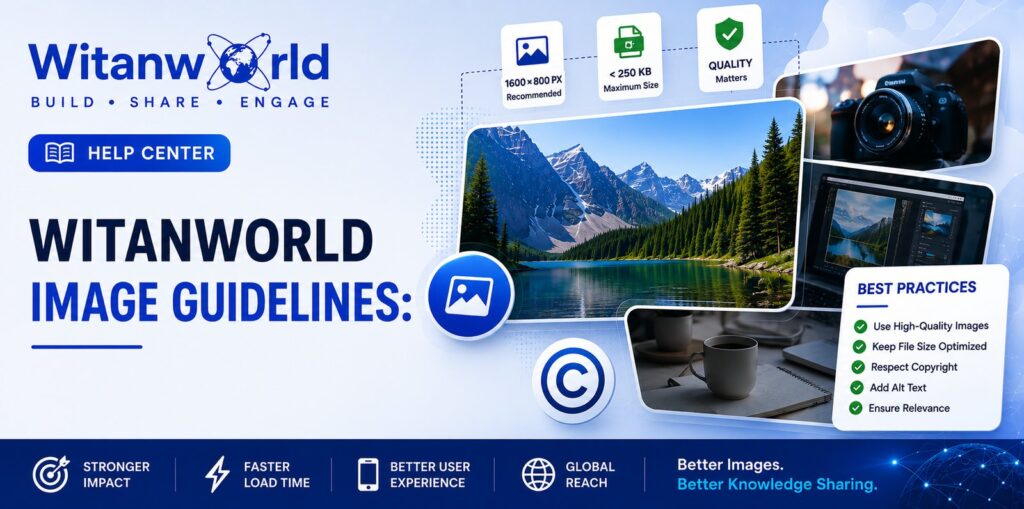
1600 × 800 pixels
This provides a 2:1 aspect ratio, which works particularly well for article banners and featured visuals.
Other images with a similar landscape proportion may also display effectively, but authors should avoid unusually tall, narrow, or irregularly shaped images for featured-image use.
Recommended Approach
Landscape Orientation
Approximately 2:1 Aspect Ratio
1600 × 800 px Preferred
A consistent image ratio helps Witanworld maintain a cleaner visual experience across articles.
5. Keep Featured Images Below 250 KB
This is one of the most important Witanworld image-optimization practices.
Recommended maximum featured-image file size: less than 250 KB
Large image files can negatively affect:
- Page-loading speed
- Mobile experience
- Bandwidth consumption
- Website performance
- Overall reader experience
A visually attractive image does not need to be several megabytes in size.
Modern image optimization can dramatically reduce file size while retaining strong visual quality.
Recommended Target
Ideal: 100–200 KB
Maximum Recommended: Below 250 KB
For highly detailed images, optimize carefully so that important text, faces, diagrams, or other details remain clear.
6. Why Image File Size Matters
Imagine two visually similar featured images:
Image A: 4.5 MB
Image B: 180 KB
If both provide acceptable visual quality, Image B is far better suited to web publishing.
Optimized images can help:
- Pages load faster
- Readers on mobile connections access content more easily
- Reduce unnecessary data transfer
- Improve overall website efficiency
- Support a better user experience
The objective is not simply to create the smallest possible image.
It is to achieve the right balance:
Quality ↔ File Size ↔ Performance
7. Recommended Image Formats
Different formats serve different purposes.
JPEG / JPG
Recommended for:
- Photographs
- People
- Landscapes
- Complex illustrations
- Article banners
- Featured images with many colors
JPEG usually provides an effective balance between visual quality and small file size.
PNG
Useful for:
- Graphics
- Logos
- Screenshots
- Images requiring transparency
- Certain diagrams
However, PNG files can become significantly larger than equivalent JPEG files.
If transparency is not required, consider whether a web-optimized JPEG provides a smaller result.
WebP
Where supported by the publishing workflow, WebP can provide excellent image quality with efficient compression.
The important principle is:
Choose the format that maintains adequate quality with the smallest practical file size.
8. Don’t Upload an Oversized Image and Depend on the Website to Resize It
A common publishing mistake is uploading a huge image directly from a camera, design application, or stock-image provider.
For example:
Original Image: 6000 × 4000 px / 8 MB
If the article only needs a 1600 × 800 px featured image, uploading the full original adds unnecessary data.
Instead:
Resize → Crop → Optimize → Compress → Upload
Preparing the image before uploading gives you greater control over its appearance and quality.
9. Maintain Image Quality
Compression should not make an image visibly poor.
Avoid images that appear:
- Pixelated
- Blurry
- Distorted
- Over-compressed
- Stretched
- Grainy
- Unnaturally sharpened
Text embedded within an image should remain legible.
If compression makes important information difficult to read, increase image quality slightly or simplify the visual.
Witanworld Standard
Optimize aggressively—but not at the expense of usability.
10. Avoid Stretching Images
Never force an image into a different aspect ratio by stretching it horizontally or vertically.
For example, converting a square photograph into a wide banner by stretching it can distort:
- Faces
- Logos
- Products
- Buildings
- Charts
- Text
Instead, crop the original image to the required ratio.
Correct
Original → Crop → Resize → Optimize
Incorrect
Original → Stretch → Distorted Image
11. Keep Important Content Away From the Extreme Edges
Featured images may appear differently depending on:
- Screen size
- Device
- Article layout
- Thumbnail placement
- Responsive design
Therefore, avoid placing essential text, logos, faces, or other important elements directly against the edges of the image.
Maintain a reasonable safe area around critical visual elements.
This helps ensure the image remains effective even if some cropping occurs in different layouts.
12. Use Minimal Text Inside Featured Images
Featured images are primarily visual.
Avoid turning them into miniature articles.
For most Witanworld featured images, the best approach is:
Strong Visual + Short Headline + Minimal Supporting Text
Instead of adding several paragraphs, lists, statistics, and explanations to the image, allow the article itself to communicate those details.
Minimal text offers several advantages:
- Cleaner appearance
- Better readability
- Stronger mobile presentation
- Greater visual impact
- Less clutter
- Easier compression
- More professional presentation
Remember
The featured image attracts attention.
The article delivers the knowledge.
13. Use High-Contrast, Readable Text
If your image includes text, make sure it remains readable.
Consider:
- Font size
- Background contrast
- Text placement
- Font weight
- Number of words
- Mobile visibility
Avoid tiny text.
A banner that looks readable on a desktop design screen may become impossible to read when displayed as a smaller thumbnail.
14. Copyright Matters
An image being available online does not automatically mean you have permission to use it.
This is one of the most important rules for Witanworld authors.
Do not assume:
I found it on Google, therefore I can use it.
Search engines help users discover images. They do not automatically grant publishing rights to those images.
Before uploading an image, you should have appropriate rights or permission to use it.
15. What Images Can You Use?
Depending on the applicable rights and license, appropriate sources may include:
Images You Created
For example:
- Your own photographs
- Your own illustrations
- Your own diagrams
- Your own infographics
- Your own screenshots, where permitted
Licensed Images
Images obtained under a license that permits the intended use.
Stock Images
Images from reputable stock-image services, provided your use complies with the applicable license.
Creative Commons Images
Certain Creative Commons licenses permit reuse under specified conditions.
However, Creative Commons licenses vary.
Some may require:
- Attribution
- A link to the source
- Identification of the creator
- Non-commercial use
- Share-alike licensing
- Other conditions
Always understand the specific license.
Public-Domain Images
Public-domain images can generally be reused more freely, but you should still verify that the work is genuinely in the public domain and whether other rights may apply.
16. When Should You Attribute an Image?
If the applicable license requires attribution, provide it.
A useful attribution may include:
Image Creator: [Name]
Source: [Source/Website]
License: [Applicable License]
Where relevant, link to the original source or license.
Do not remove required attribution simply to make the article look cleaner.
Best Practice
If you cannot determine:
Who owns the image?
or
Whether you have permission to use it?
choose another image.
17. Don’t Remove Watermarks
Do not upload an image after removing or obscuring a watermark unless you have explicit rights to use an unwatermarked version.
Watermarks commonly indicate:
- Ownership
- Licensing restrictions
- Stock-image previews
- Copyright protection
Removing a watermark does not create usage rights.
Instead, obtain the properly licensed image.
18. AI-Generated Images
AI-generated imagery can be useful for:
- Conceptual illustrations
- Article banners
- Abstract topics
- Educational visuals
- Technology articles
- Knowledge diagrams
- Creative storytelling
However, AI-generated images should still meet Witanworld’s quality standards.
Before using an AI-generated visual, check carefully for:
- Misspelled text
- Incorrect logos
- Distorted hands or faces
- Impossible objects
- Incorrect charts
- Misleading representations
- Fake interfaces
- Unintended visual artifacts
AI-generated imagery should not be used in a way that intentionally misleads readers about real people, real events, evidence, data, or factual situations.
Recommended Principle
Use AI to enhance communication—not to manufacture misleading evidence.
19. Be Careful With Logos & Trademarks
Company logos and trademarks may be protected intellectual property.
Do not assume that a logo can be freely modified or used simply because it is publicly available.
When using a third-party logo:
- Make sure its use is relevant
- Avoid implying endorsement
- Do not distort the logo
- Follow applicable brand guidelines
- Ensure you have appropriate rights where required
When creating Witanworld-related Help Center or official Witanworld content, use the approved Witanworld logo rather than recreating or approximating it.
20. Screenshots
Screenshots can be highly useful in instructional content.
They can help explain:
- How a feature works
- Where an option is located
- How to complete a process
- What a user should expect
Before publishing screenshots:
- Crop unnecessary areas
- Remove irrelevant browser clutter
- Protect sensitive information
- Hide personal information where appropriate
- Ensure text remains readable
- Compress the screenshot
- Add annotations only when useful
Never expose passwords, payment credentials, private account information, confidential information, or other sensitive data.
21. Images Containing People
Images featuring people should be selected carefully.
Ask:
- Is the image relevant?
- Do I have appropriate usage rights?
- Does the image represent the subject appropriately?
- Could it misleadingly imply endorsement?
- Does it respect the individuals depicted?
For global content, choose imagery that feels inclusive and appropriate for an international audience.
22. Image SEO
Images can also support the discoverability and structure of an article when properly prepared.
A good image should have:
- Descriptive filename
- Relevant alternative text
- Appropriate context
- Efficient file size
- Strong visual relevance
Avoid filenames such as:
IMG_938472.jpg
Instead use something descriptive, such as:
witanworld-image-guidelines-featured-images.jpg
This makes the file easier to identify and manage.
23. Write Useful Alt Text
Alternative text (alt text) describes the purpose or content of an image.
It is particularly important for accessibility.
Instead of:
Alt Text: image
use something meaningful, such as:
Alt Text: Witanworld guide to featured image size, copyright and image optimization
Alt text should generally be:
- Concise
- Descriptive
- Relevant
- Natural
Do not stuff alt text with repetitive keywords simply for SEO.
Accessibility comes first.
24. Don’t Keyword-Stuff Image Information
Poor example:
Witanworld image SEO image guidelines best images Witanworld SEO featured image optimization Witanworld.
Better:
Witanworld featured image optimization and copyright guidelines.
Write for people first.
Search optimization should improve clarity—not make the content unnatural.
25. Images Within the Article
Featured images are not the only useful visuals.
Longer articles may benefit from additional images such as:
- Diagrams
- Charts
- Screenshots
- Infographics
- Process illustrations
- Maps
- Examples
- Educational graphics
Use these when they help explain the content.
Do not insert images merely to make an article longer or more visually busy.
Every image should ideally answer the question:
Does this help the reader understand something?
If the answer is no, reconsider whether it is needed.
26. Charts, Graphs & Data Visualizations
When using a chart or graph:
- Make labels readable
- Cite the data source where appropriate
- Avoid misleading scales
- Use accurate numbers
- Include sufficient context
- Make the visual understandable
- Ensure the image is optimized
Do not alter a graph in a way that creates a misleading impression of the underlying data.
For knowledge-sharing content, accuracy is more important than decoration.
27. Common Image Mistakes to Avoid
Authors should avoid:
- Uploading multi-megabyte featured images
- Using blurry images
- Stretching images
- Using unrelated stock photography
- Copying images from Google without checking rights
- Removing watermarks
- Using copyrighted images without appropriate permission
- Adding excessive text to banners
- Using tiny unreadable fonts
- Uploading poorly cropped screenshots
- Exposing private information in screenshots
- Using misleading AI-generated visuals
- Keyword stuffing alt text
- Using generic filenames
- Publishing images with visible generation errors
- Uploading an incorrect or altered brand logo
28. Recommended Witanworld Image Workflow
For every important article image, follow this process:
Step 1 — Select
Choose a relevant image that genuinely supports the article.
Step 2 — Verify Rights
Confirm that you created it, licensed it, have permission to use it, or can otherwise lawfully publish it.
Step 3 — Crop
Prepare the correct landscape composition.
Step 4 — Resize
For featured images, target approximately:
1600 × 800 px
Step 5 — Simplify
Remove unnecessary text and visual clutter.
Step 6 — Optimize
Choose an appropriate JPEG, PNG, or other supported web format.
Step 7 — Compress
Aim for:
Below 250 KB
Step 8 — Rename
Use a descriptive filename.
Step 9 — Add Alt Text
Describe the image clearly and naturally.
Step 10 — Preview
Check the image within the article before publishing.
29. Witanworld Featured Image Checklist
Before publishing, ask:
Is the image relevant to my article?
Is it professional and visually clear?
Do I have the right to use it?
Have I provided attribution where required?
Is it approximately 1600 × 800 px or an appropriate landscape ratio?
Is the file below 250 KB?
Is important content away from the edges?
Is embedded text minimal and readable?
Is the image free from distortion?
Is the filename descriptive?
Have I added useful alt text?
Have I checked AI-generated imagery for errors, if applicable?
Have I protected sensitive information in screenshots?
Does the final image still look good after compression?
Have I previewed the article before publishing?
If you can answer yes to these questions, your featured image is generally ready for publication.
30. Quick Image Standards Reference
| Area | Recommended Witanworld Practice |
|---|---|
| Featured Image | Recommended for articles |
| Preferred Dimensions | Approximately 1600 × 800 px |
| Aspect Ratio | Approximately 2:1 landscape |
| File Size | Less than 250 KB |
| Format | JPEG/JPG commonly recommended; PNG where appropriate |
| Image Quality | Clear, professional and web optimized |
| Image Relevance | Must meaningfully relate to the article |
| Embedded Text | Keep minimal |
| Copyright | Use only images you have appropriate rights to publish |
| Attribution | Provide when required by the license |
| Watermarks | Do not remove without authorization |
| AI Images | Review carefully for accuracy and misleading elements |
| Filename | Descriptive and relevant |
| Alt Text | Concise and descriptive |
| Screenshots | Remove or obscure sensitive information |
31. Frequently Asked Questions
What size should my Witanworld featured image be?
For consistency, a 1600 × 800 px landscape image is a strong recommended standard.
What is the recommended maximum file size?
Keep featured images below 250 KB wherever practical.
Can I upload a 5 MB image?
You should optimize it before uploading. Resize and compress the image while maintaining acceptable visual quality.
Can I use an image I found through Google Images?
Finding an image through a search engine does not automatically give you permission to publish it. Verify the image’s copyright and licensing status.
Can I use stock photographs?
Yes, provided your use complies with the applicable stock-image license.
Can I use AI-generated images?
AI-generated images can be used where appropriate, but they should be carefully reviewed for quality, accuracy, misleading elements, and any applicable usage requirements.
Should my featured image contain the article title?
It can, but it is not necessary. If text is included, keep it short and readable.
Can I use the Witanworld logo?
For official Witanworld-related content, use the approved Witanworld logo and preserve its visual integrity.
Should I add alt text?
Yes. Useful alt text improves accessibility and provides meaningful context for the image.
Can I use several images in one article?
Yes, where additional images genuinely improve understanding. Avoid adding unnecessary visuals simply for decoration.
32. The Witanworld Image Principle
A successful article image should achieve four things:
Attract
Capture attention without becoming sensational or misleading.
Explain
Help readers understand the article’s topic or information.
Respect
Respect copyright, ownership, licensing, privacy, and attribution requirements.
Perform
Remain visually strong while being optimized for fast web delivery.
The ideal workflow is:
Select → Verify → Resize → Optimize → Compress → Describe → Preview → Publish
Conclusion
Images can significantly improve the way knowledge is discovered, understood, and shared on Witanworld.
But the best image is not necessarily the largest, most complicated, or most colorful one.
The best image is one that is:
Relevant. Clear. Properly Licensed. Optimized. Accessible.
For featured images, remember the core Witanworld recommendations:
- 1600 × 800 px
- Landscape / approximately 2:1
- Less than 250 KB
- Minimal embedded text
- Clear copyright or usage rights
- Descriptive filename and alt text
Before clicking Publish, take a final look at your featured image and ask:
Does this visual strengthen the knowledge I am sharing?
If it does, you are on the right track.
Better Images. Faster Pages. Stronger Content. Greater Impact.
Related Articles
- How to Publish Your First Article on Witanworld
- Witanworld SEO Guide: How to Optimize Your Articles for Maximum Visibility
- Copyright, Plagiarism & Content Ownership on Witanworld
- Why Was My Article Rejected? Understanding Editorial Review
- How to Edit, Update or Delete a Published Article on Witanworld.









Leave a Reply