






A customer finds a product on their phone during a lunch break, adds it to the cart and returns later from a laptop to complete the purchase. The cart is empty. The discount code no longer works. When they contact support, the agent asks them to explain everything again.
None of these problems is particularly unusual. Together, though, they can turn a straightforward purchase into an irritating experience.
That is the challenge at the heart of digital customer experience. Customers do not necessarily think about the different systems behind a website, mobile application, payment service or support desk. They simply expect a business to recognise what they are trying to accomplish and make the process reasonably easy.
For businesses, improving those interactions involves more than attractive design or sophisticated technology. It requires an understanding of customer behaviour, dependable systems, clear communication and a willingness to investigate what happens when things go wrong.
This guide explores how organisations can improve their digital customer experience, where to focus their resources and how to measure whether their efforts are making a difference.
What Is Digital Customer Experience?
Digital customer experience, often shortened to digital CX or DCX, refers to the overall impression customers develop through their interactions with a business across digital channels.
These interactions may include browsing a website, using an application, reading an email, completing an online purchase, contacting a chatbot or receiving support through social media.
Each interaction contributes to the customer’s perception of the organisation.
A banking customer might appreciate an application that makes routine transfers simple but become frustrated when a disputed transaction requires several calls to customer support. A retail customer might enjoy personalised recommendations but lose confidence when delivery information changes without explanation.
Digital CX therefore includes the quality of individual interactions and the continuity between them.
How Digital CX Differs from User Experience
Digital customer experience and user experience (UX) are closely related, but they are not interchangeable.
UX generally focuses on how people interact with a particular product, service or interface. It examines usability, navigation, accessibility, clarity and task completion.
Digital CX takes a broader view.
It considers how multiple interactions contribute to the customer’s relationship with a business over time.
A website may have excellent usability while the overall customer experience remains poor because deliveries are unreliable or support teams cannot resolve problems.
Likewise, a customer may tolerate a slightly dated interface if the service is dependable, transparent and responsive.
The distinction matters because improving one screen does not necessarily improve the entire customer journey.
Why Digital Customer Experience Matters
Customers increasingly use digital channels to research products, compare alternatives, make purchases and manage existing relationships with businesses.
That makes digital interactions an important part of how trust is established and maintained.
A clear product description helps someone make an informed decision. An accurate delivery estimate reduces uncertainty. A straightforward returns process makes a purchase feel less risky.
Poor experiences have the opposite effect.
Unexpected fees, inaccessible forms, failed payments and repeated requests for information can make customers question whether a business is reliable.
These problems can also create costs for the organisation.
When customers cannot complete a task online, they may contact support. When a checkout process fails, a potential sale may be lost. When information is inconsistent across channels, employees spend time correcting misunderstandings.
Improving digital CX can therefore support several business objectives:
- Helping customers complete important tasks.
- Reducing avoidable service contacts.
- Improving conversion and retention.
- Increasing confidence in digital services.
- Making customer support more efficient.
- Identifying product and process problems earlier.
However, the financial impact depends on the problem being solved, the customer population and the cost of the improvement.
A redesign does not automatically increase revenue. Businesses need evidence that the changes address meaningful customer difficulties.
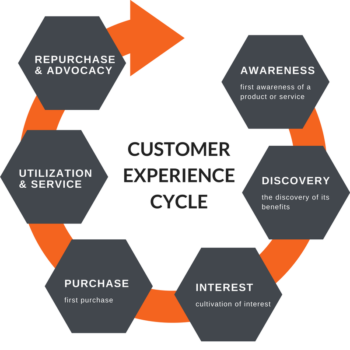
Understanding the Digital Customer Journey
Before improving an experience, organisations need to understand what customers are actually trying to do.
A customer journey describes the sequence of interactions involved in achieving a goal.
For an online retailer, that journey might begin with a search engine and continue through product research, checkout, delivery, returns and repeat purchases.
For a software provider, it could involve discovering the product, requesting a demonstration, subscribing, completing onboarding and contacting technical support.
The most useful journey maps go beyond listing channels.
They examine customer expectations, decisions, questions, frustrations and the systems involved at each stage.
Identify the Important Touchpoints
A digital touchpoint is any interaction between a customer and a business through a digital channel.
Common examples include search results, landing pages, account registration, payment forms, order notifications, mobile applications and support conversations.
Not every touchpoint deserves equal attention.
A minor inconsistency in an informational page may have little impact, while a broken payment process can prevent customers from completing a purchase.
Organisations should prioritise interactions according to customer importance, frequency, severity of problems and business consequences.
Look for Friction Between Channels
Some of the most frustrating customer experiences occur when information fails to move between systems.
Consider a customer who reports a billing problem through live chat.
The agent promises a follow-up, but the customer receives no update. Two days later, they call the support team and discover that the new agent cannot see the previous conversation.
The problem is not simply the quality of the chat interface. It is the absence of continuity between service channels.
Journey mapping should therefore examine what happens during handoffs, not just within individual applications.
Use Research Instead of Assumptions
Analytics can show where customers abandon a process, but it may not explain why.
A high exit rate on a checkout page could reflect unexpected delivery charges, limited payment methods, confusing instructions or customers who were never ready to purchase.
Customer interviews, usability testing, support transcripts and direct observation can help distinguish between these explanations.
Combining behavioural data with qualitative research usually provides a more useful picture than relying on either approach alone.
Building a Digital Customer Experience Strategy
An effective digital CX strategy begins with specific customer problems rather than a list of technologies to purchase.
A business might discover that customers struggle to understand subscription pricing, that mobile users frequently abandon registration or that support agents lack access to previous interactions.
Each problem calls for a different response.
Define the Customer Outcome
Start by describing what customers should be able to accomplish.
For example:
“Customers should be able to understand the full cost of an order before entering payment information.”
That is more useful than a vague objective such as “deliver a world-class checkout experience.”
The first statement can guide design decisions and testing. The second provides little direction.
Establish a Baseline
Before making changes, measure the current experience.
For checkout improvements, useful measures might include task completion, payment errors, abandonment at specific steps and customer feedback.
For support improvements, the organisation might examine repeat contacts, resolution quality and the effort customers report.
Without a baseline, it becomes difficult to know whether an initiative produced meaningful progress.
Assign Ownership Across Teams
Customer journeys rarely fit neatly within one department.
Marketing may manage acquisition, product teams may own the application, operations may control fulfilment, and customer service may handle complaints.
A cross-functional approach is essential when problems span those boundaries.
Each improvement initiative should have a responsible owner, agreed objectives and a way to resolve dependencies between teams.
Prioritise Before Investing
Not every organisation needs a customer data platform, advanced recommendation engine or conversational AI system.
A smaller business may achieve greater value by improving navigation, fixing payment errors and publishing clearer delivery information.
Prioritisation should consider customer impact, expected business benefit, implementation effort, technical dependencies and risk.
Technology should follow the problem, not define it.
Improving Website and Mobile App Experiences
Websites and applications are often the most visible parts of digital CX.
Their design affects how easily customers find information, understand choices and complete tasks.
Good design is not necessarily minimal or visually elaborate. It is appropriate to the task and understandable to the intended audience.
Make Navigation Predictable
Customers should be able to recognise where they are and how to reach relevant information.
Clear labels, logical categories, useful search functions and consistent navigation patterns help achieve this.
There is no universal rule requiring every page to be accessible within three clicks.
The Nielsen Norman Group has explained why the commonly repeated three-click rule is not supported as a general usability requirement.
What matters more is whether people understand their options and can complete tasks without unnecessary confusion.
A complex financial application may legitimately require more steps than a simple product catalogue, particularly when security or regulatory requirements are involved.
Reduce Unnecessary Form Friction
Forms frequently create avoidable problems.
Customers may be asked for information the business already holds, required to enter data in an unfamiliar format or given unclear error messages.
Improving forms can involve removing unnecessary fields, explaining why information is required, supporting appropriate autofill and preserving entered information when an error occurs.
Errors should be described in language that helps the user correct them.
A message such as “Something went wrong” provides little assistance.
“Your payment was not completed. No charge has been made. Please try another payment method or contact support” is more useful when those statements accurately reflect the transaction status.
Design for Mobile Use
Mobile interfaces need to account for smaller screens, touch interaction and changing network conditions.
Buttons should be easy to activate, text should remain readable and important actions should not be hidden behind confusing navigation.
Mobile design should also consider customers who are interrupted during a task.
Where appropriate, saving progress can help people resume without starting again.
Treat Accessibility as a Core Requirement
Accessibility should be considered throughout design and development rather than added immediately before launch.
The Web Content Accessibility Guidelines (WCAG) 2.2 provide a recognised framework for improving accessibility.
Relevant practices include meaningful alternative text, keyboard-operable controls, sufficient colour contrast, visible focus indicators, accessible form labels and captions for appropriate video content.
Automated accessibility tools can identify certain problems, but they cannot replace manual evaluation and testing with people who use assistive technologies.
Accessibility is also an ongoing responsibility. New features and content can introduce barriers even after an earlier audit.
Website Performance and Customer Experience
A website may be visually attractive and functionally complete, yet still frustrate customers because it responds slowly.
Performance problems are especially noticeable during checkout, account access and other tasks where customers expect immediate feedback.
Google’s Core Web Vitals provide useful measures of loading performance, responsiveness and visual stability.
| Metric | What it measures | Google’s good-performance threshold |
|---|---|---|
| Largest Contentful Paint (LCP) | Loading of the main visible content | 2.5 seconds or less |
| Interaction to Next Paint (INP) | Responsiveness to user interactions | 200 milliseconds or less |
| Cumulative Layout Shift (CLS) | Unexpected movement of visible content | 0.1 or less |
These thresholds are evaluated using real-user performance data, typically at the 75th percentile.
They are useful diagnostic measures, but they do not describe every aspect of customer experience.
A technically fast page can still be difficult to understand, and a page with good performance scores can still contain a broken checkout process.
Practical Performance Improvements
Performance work may involve compressing images, reducing unnecessary JavaScript, improving server response times, using caching effectively and limiting third-party scripts.
Teams should also investigate how their applications behave on less powerful devices and slower connections.
Testing only on high-end office equipment can conceal problems experienced by customers.
The objective is not to pursue a perfect performance score at any cost. It is to make important customer interactions dependable and responsive.
Personalization Without Compromising Privacy
Personalization can make digital services more relevant.
An online bookstore might recommend titles related to subjects a customer has explored. A business software platform might display frequently used features more prominently. A retailer might remember a customer’s preferred delivery location.
These examples can reduce effort when they are accurate and welcome.
Personalization becomes less useful when it is intrusive, misleading or based on poor assumptions.
Start with Simple, Helpful Personalization
Businesses do not need sophisticated machine learning to provide relevant experiences.
Remembering language preferences, showing recently viewed products or allowing customers to save common settings can make a meaningful difference.
More advanced techniques, including recommendation systems and predictive models, may be useful when an organisation has sufficient data, a clear business case and the ability to monitor performance.
Give Customers Meaningful Control
Customers should understand how their information is used and have appropriate choices over optional personalization and marketing.
Data collection should be proportionate to the service being provided.
Organisations also need to consider applicable privacy laws, retention periods, security and access controls.
A recommendation system that improves engagement but damages customer trust may be a poor long-term investment.
Avoid Overpersonalization
Not every interaction benefits from being tailored.
An unexpected reference to a customer’s location, inferred emotional state or sensitive circumstances may feel uncomfortable.
Personalization should help people accomplish their goals, not create the impression that every action is being monitored.
It is also important to provide ways to correct inaccurate preferences and recommendations.
Creating Consistent Omnichannel Experiences
Customers often move between digital and physical channels during a single journey.
Someone may research a product online, ask a question through chat, purchase in a store and request support through email.
An omnichannel approach aims to maintain useful continuity across those interactions.
That does not mean every channel must look or behave identically.
A mobile application, physical service desk and email conversation have different capabilities. What matters is that information and expectations remain consistent.
Connect Customer Information Responsibly
Where appropriate and authorised, customer-facing teams should be able to access the information required to resolve an issue.
For example, a support agent may need to see an order’s status, previous service requests and the outcome of earlier conversations.
This does not justify unrestricted access to all customer data.
Permissions should reflect employees’ responsibilities, and sensitive information should be protected.
Keep Policies and Information Consistent
Customers should not receive conflicting answers about prices, delivery dates, eligibility or returns depending on which channel they use.
When policies change, updates need to reach websites, applications, support teams and relevant automated systems.
Consistency requires operational coordination, not merely shared branding.
Preserve Context During Handoffs
If a chatbot cannot resolve a billing problem, the customer should not have to repeat the entire conversation when transferred to a human agent.
A concise handoff summary, relevant transaction details and a clear record of actions already attempted can reduce frustration.
The quality of the handoff is often more important than the sophistication of the chatbot itself.
Customer Support and the Role of AI
Digital customer support now includes live chat, self-service knowledge bases, email, messaging platforms and AI-assisted tools.
Each has strengths and limitations.
A well-organised help centre may be the quickest option for routine questions. Live chat may be more useful when a customer needs clarification. A trained specialist may be necessary for complex or sensitive issues.
The objective should be effective resolution, not simply reducing the number of conversations handled by employees.
Where Chatbots Can Help
Chatbots can assist with common questions, basic troubleshooting, order status requests and navigation to relevant resources.
When connected to reliable systems, they may also help customers complete straightforward tasks.
However, an automated assistant that provides incorrect information or repeatedly fails to understand a request can make the experience worse.
Businesses should test chatbot responses, monitor failures and establish clear escalation paths.
Keep Human Support Available
Customers need an understandable route to human assistance when automation is insufficient.
This is particularly important for disputed charges, accessibility difficulties, account security problems and situations involving significant consequences.
Escalation should preserve relevant context whenever possible.
Measure Resolution Quality
A short conversation is not necessarily a successful conversation.
If a customer contacts support three times about the same issue, an apparently fast initial response may have achieved very little.
Useful measures include resolution quality, repeat-contact rates, customer effort and whether the problem remains resolved.
AI tools should be assessed against these outcomes rather than the volume of conversations they automate.
Content as Part of Digital Customer Experience
Content influences how customers understand products, make decisions and solve problems.
Clear explanations can prevent confusion before it reaches the support team.
Poor content can create unnecessary work for both customers and employees.
Write for Customer Questions
Product pages should explain important features, limitations, pricing and eligibility.
Support articles should describe what customers need to do, what information they require and what happens next.
Avoid internal terminology where simpler language is available.
For example, “Your refund will be returned to your original payment method” is easier to understand than a description filled with internal payment-processing terms.
Make Information Easy to Find
Search engine optimisation can help people discover useful content, but visibility alone does not make that content valuable.
Pages should answer the questions suggested by their titles and search intent.
Descriptive headings, clear examples and relevant internal links help readers navigate longer explanations.
Important policies should be accessible before customers commit to a purchase or subscription.
Maintain Content Accuracy
Outdated support articles can create confusion even when the website itself works correctly.
Businesses should assign responsibility for reviewing information about prices, policies, product features and processes.
Content maintenance is part of customer experience management, not simply an editorial task.
Measuring Digital Customer Experience
Improving CX requires more than monitoring website visits or collecting occasional satisfaction surveys.
Different measures reveal different aspects of the customer journey.
A useful measurement framework combines customer perceptions, observed behaviour, operational performance and business outcomes.
Customer Experience Metrics
| Metric | What it helps explain | What to watch for |
|---|---|---|
| Customer Satisfaction (CSAT) | How customers rate a specific experience | Survey timing and response bias |
| Customer Effort Score (CES) | How difficult customers perceive a task to be | Differences in question wording |
| Net Promoter Score (NPS) | Customers’ stated willingness to recommend | Does not directly establish future behaviour |
| Task completion rate | Whether customers achieve a defined goal | Tasks must be consistently defined |
| Repeat-contact rate | Whether customers need further assistance | Some repeat contacts are legitimate |
| Customer retention | Whether customers continue their relationship | Influenced by pricing, competition and product quality |
| Conversion rate | Whether visitors complete a desired action | Sensitive to traffic sources and customer intent |
No single metric captures the entire experience.
A business may improve its conversion rate while customer satisfaction declines because customers feel pressured into purchasing.
Similarly, support costs may fall because customers are abandoning requests rather than receiving better service.
Metrics should be interpreted together.
Combine Quantitative and Qualitative Evidence
Analytics can identify unusual patterns, but customer interviews and usability testing can help explain them.
Suppose an application shows a high abandonment rate during identity verification.
The analytics indicate where the problem occurs.
Observing users may reveal that the instructions are unclear, the camera permission request is confusing or the verification process repeatedly fails on certain devices.
These findings can lead to more targeted improvements than a general redesign.
Establish Meaningful Targets
Targets should reflect the organisation’s baseline, customer needs and business context.
A business might aim to reduce payment failures, improve successful self-service resolution or shorten the time required to complete account registration.
The target should specify what is being measured, the relevant customer group and the evaluation period.
Where possible, teams should distinguish the effects of their changes from seasonal demand, marketing campaigns and other external influences.
A Practical Example: Improving an Online Checkout
Consider a hypothetical retailer experiencing a high rate of checkout abandonment.
The management team initially proposes introducing an AI recommendation engine to increase sales.
Before investing, the product team reviews checkout analytics, support requests and recordings from consented usability sessions.
Several problems emerge.
Customers cannot see the full delivery cost until late in checkout. The mobile address form is difficult to complete. Some payment failures produce unclear error messages.
These issues are more immediate than the absence of personalised recommendations.
The retailer decides to address them first.
Delivery charges are displayed earlier. Address fields are simplified. Payment errors are rewritten to explain what happened and what the customer can do next.
The team then tests the revised checkout with customers and compares performance against the previous version.
The evaluation includes checkout completion, payment error rates, reported effort and support contacts.
If the results improve consistently, the retailer has evidence supporting the changes.
If they do not, the team investigates further rather than assuming that the redesign must have worked.
This example illustrates an important principle: effective CX improvement often begins by removing ordinary obstacles, not by introducing advanced technology.
Testing and Continuous Improvement
Customer needs, devices, business processes and technology change over time.
A digital experience that works well today may become less effective as products evolve or customer expectations shift.
Continuous improvement requires a repeatable process for identifying problems, testing solutions and reviewing outcomes.
Use Usability Testing
Usability testing involves observing people as they attempt realistic tasks.
Participants might be asked to find a policy, compare subscription options, complete a purchase or request a refund.
The aim is to understand where the design creates confusion.
Testing should include people who reflect the intended audience, including users with relevant accessibility needs.
Use A/B Testing Appropriately
A/B testing compares alternative experiences to examine their effects on defined outcomes.
For example, a business might test two versions of a checkout form.
A useful experiment requires a clear hypothesis, appropriate measurement, sufficient data and safeguards against misleading conclusions.
Results should not be interpreted solely by selecting whichever variation produced the highest short-term conversion rate.
Businesses should also consider accessibility, customer trust, complaint rates and unintended consequences.
Review Changes After Launch
Not every problem appears during pre-release testing.
Monitoring after launch can reveal device-specific failures, unexpected customer behaviour and integration issues.
Teams should establish a process for investigating problems, assigning responsibility and confirming whether corrective actions work.
Common Digital CX Mistakes
Some organisations invest heavily in customer-facing technology while overlooking the operational problems that shape customer experience.
Several mistakes recur across industries.
Automating a Broken Process
A chatbot cannot compensate for a confusing refund policy or an unreliable order-management system.
Automation may make the problem more visible rather than solve it.
Improve the underlying process before deciding which parts should be automated.
Collecting Data Without Using It
Businesses often gather large volumes of analytics and feedback but lack a clear process for acting on the findings.
Data has limited value if teams cannot connect it to decisions.
A smaller set of relevant measures, reviewed regularly by responsible teams, may be more useful than an elaborate dashboard nobody uses.
Treating Personalization as a Universal Solution
Personalization can improve relevance, but it can also introduce privacy concerns, inaccurate recommendations and unnecessary complexity.
Businesses should establish whether customers actually benefit from a personalised experience before expanding data collection or deploying more advanced systems.
Focusing Only on Acquisition
A polished landing page cannot compensate for difficult onboarding, unreliable service or poor support.
Customer experience continues after conversion.
Retention, service quality and problem resolution deserve attention alongside marketing performance.
Ignoring Accessibility
Accessibility barriers can prevent customers from completing essential tasks.
Treating accessibility as an optional enhancement creates avoidable exclusion and may introduce compliance risks.
It should be incorporated into design, development, content and testing processes.
Measuring Activity Instead of Outcomes
More chatbot conversations, more page views or more personalised messages do not necessarily indicate a better experience.
The more important questions are whether customers can complete tasks, resolve problems and maintain confidence in the service.
A Practical Digital CX Improvement Roadmap
Organisations do not need to transform every customer touchpoint simultaneously.
A phased approach can help teams focus resources and demonstrate progress.
Understand the Current Experience
Begin with customer research, analytics, support feedback and an inventory of important digital journeys.
Identify recurring problems and determine which customer groups are most affected.
Document existing performance so future changes can be evaluated.
Address High-Impact Friction
Prioritise problems that prevent customers from completing important tasks.
These may include inaccessible forms, broken checkout steps, unclear policies, slow pages or inconsistent support information.
Many of these improvements are less expensive than major platform replacements.
Improve Cross-Channel Coordination
Once critical problems are under control, examine handoffs between applications, departments and service channels.
Improve access to relevant customer information, align policies and reduce unnecessary repetition.
Introduce Advanced Capabilities Selectively
Personalization, predictive analytics and AI-assisted support may be appropriate when they solve clearly defined problems.
Evaluate their costs, data requirements, risks and ongoing maintenance needs.
Pilot new capabilities before committing to large-scale deployment.
Establish Continuous Governance
Assign responsibility for customer journeys, define review cycles and maintain a process for incorporating feedback.
Customer experience should become part of regular operational decision-making rather than a one-time redesign project.
Frequently Asked Questions
What is digital customer experience?
Digital customer experience refers to the overall impression customers develop through interactions with a business across digital channels, including websites, mobile applications, online transactions, email and customer support.
It includes usability, accessibility, reliability, communication and continuity between interactions.
What is the difference between digital CX and UX?
UX focuses primarily on the experience of interacting with a product or interface.
Digital CX covers the broader customer relationship across multiple digital touchpoints and stages of the customer journey.
UX is an important component of digital CX, but it does not account for every factor influencing customer satisfaction.
How can a small business improve digital customer experience?
Small businesses can begin by improving website clarity, mobile usability, payment reliability, product information and customer support.
Customer feedback and basic analytics can help identify the most important problems.
Expensive personalization platforms or advanced AI systems are not necessary for every business.
What are the most important digital CX metrics?
Useful measures include CSAT, Customer Effort Score, task completion, conversion, repeat-contact rates and customer retention.
The right combination depends on the customer journey and the organisation’s objectives.
No single metric should be treated as a complete measure of customer experience.
How does personalization improve digital CX?
Personalization can reduce effort by presenting relevant information, remembering useful preferences and adapting services to customer needs.
Its effectiveness depends on accuracy, context and customer acceptance.
Businesses should provide appropriate privacy protections and meaningful controls.
What is an omnichannel customer experience?
An omnichannel experience connects relevant interactions across channels so customers can move between them without unnecessary disruption.
For example, a support agent may be able to continue a conversation started through chat without requiring the customer to repeat the problem.
Can AI improve customer experience?
AI can help with routine support, information retrieval, recommendations and certain operational tasks.
However, it can also introduce errors, privacy concerns and poor automated interactions.
Its value should be measured through customer outcomes, with human escalation available where needed.
Why is accessibility important in digital CX?
Accessibility helps people with disabilities use digital services and complete essential tasks.
Accessible design can also improve usability more broadly.
Organisations should use recognised standards such as WCAG 2.2 and include manual and user testing rather than relying exclusively on automated tools.
How often should businesses review their digital CX strategy?
Important performance and service measures should be monitored regularly, while broader strategy reviews can follow the organisation’s planning cycle.
Major product launches, customer complaints, regulatory changes and persistent performance problems may require earlier reassessment.
Conclusion
Digital customer experience is shaped by the details customers encounter while trying to accomplish ordinary tasks.
A clear explanation, reliable payment process, accessible form or well-informed support agent may not attract much attention when everything works. But these interactions influence whether customers feel confident dealing with a business.
Improving digital CX starts with understanding those experiences rather than assuming that newer technology will automatically make them better.
Businesses need to identify the journeys that matter, investigate the problems customers face, coordinate the teams responsible and measure the effects of their changes.
Personalization, omnichannel systems and AI can contribute when they serve a genuine purpose. They are not substitutes for clear communication, dependable processes or thoughtful design.
The most effective digital experiences are not necessarily the most elaborate. They are the ones that help customers get things done with less confusion, unnecessary effort and uncertainty.
References and Further Reading
- World Wide Web Consortium (W3C). Web Content Accessibility Guidelines (WCAG) 2.2. https://www.w3.org/TR/WCAG22/
- Google Search Central. Understanding Core Web Vitals and Google Search Results. https://developers.google.com/search/docs/appearance/core-web-vitals
- Nielsen Norman Group. The 3-Click Rule for Navigation Is False. https://www.nngroup.com/articles/3-click-rule/









Leave a Reply